
September 7, 2023
iPhone
7 Best AI Art Generator Apps for Android and iPhone
The meaningful split among AI art apps today isn’t image quality — most leading models now produce comparably impressive output — but licensing and usage rights. Some tools are trained on licensed content and cleared for commercial use; others sit in legal grey areas that make them fine for personal projects but risky to sell or publish. This guide covers the 10 best mobile options with that distinction made clear for each. If you prefer drawing by hand, see our roundup of the best drawing apps for Android.
Best AI Art Generator Apps at a Glance
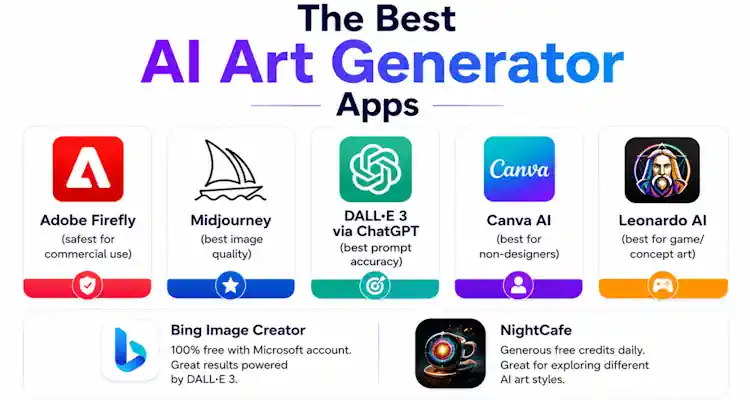
| App | Best for | Free? | Platform |
|---|---|---|---|
| Adobe Firefly | Commercial-safe images | Limited | iOS + Android |
| Midjourney | Best overall quality | No (from $10/mo) | Mobile browser |
| DALL-E 3 (ChatGPT) | Prompt accuracy, text in images | Limited | iOS + Android |
| Canva AI | Non-designers, social posts | Yes | iOS + Android |
| NightCafe | Daily free credits | Yes | iOS + Android |
| Bing Image Creator | Completely free DALL-E 3 | Yes | Mobile browser |
| DreamStudio | Technical control | Pay-per-gen | Mobile browser |
| Lensa AI | AI selfie portraits | Paid | iOS + Android |
| Dream by WOMBO | Absolute beginners | Yes | iOS + Android |
| Leonardo AI | Game & concept art | 150 tokens/day | Mobile browser |
The 10 Best AI Art Generator Apps, Reviewed
1. Adobe Firefly — Best for Commercial Use
Pros
- Commercially safe (licensed training data)
- Excellent text effects & generative fill
- Ties into Photoshop/Express
Cons
- Full access needs Creative Cloud
- Style range narrower than Midjourney
Best for: Anything you intend to sell or publish commercially.
2. Midjourney — Best Image Quality Overall
Pros
- Best-in-class aesthetic quality
- Superb for concept art & moodboards
- No Discord needed anymore
Cons
- No free tier ($10/mo+)
- Fights you on exact layout/text
Best for: The most visually stunning results, if you’ll pay.
3. DALL-E 3 via ChatGPT — Best Prompt Understanding
Pros
- Best at following detailed prompts
- Conversational editing
- Handles text in images well
Cons
- Free tier has daily limits
- Less stylised than Midjourney
Best for: Complex, specific prompts described in plain language.
4. Canva AI — Best for Non-Designers
Pros
- Generation + design in one place
- Effortless for social posts
- Generous free tier
Cons
- More generations need Canva Pro
- Less raw control than dedicated tools
Best for: Design-ready images without design skills.
5. NightCafe — Best Free Credits
Pros
- Daily free credits
- Multiple models to experiment with
- Active creative community
Cons
- Heavy use needs credit top-ups
- Interface is busy
Best for: Experimenting across models on a budget.
6. Bing Image Creator — Best Completely Free Option
Pros
- Genuinely free, high quality
- DALL-E 3 under the hood
- No app needed — works in browser
Cons
- Daily generation limit
- Fewer controls than paid tools
Best for: Excellent results at zero cost.
7. DreamStudio — Best Technical Control
Pros
- Fine-grained parameter control
- No subscription (credits)
- Reproducible via seeds
Cons
- Steeper learning curve
- Credits run down with heavy use
Best for: Power users who want to tune every parameter.
8. Lensa AI — Best AI Portraits
Pros
- Great stylised self-portraits
- No prompt skills needed
- Cheap one-off packs
Cons
- Portraits only, not general art
- Pay per avatar pack
Best for: Turning your selfies into portrait art.
9. Dream by WOMBO — Best for Beginners
Pros
- Dead-simple to use
- Fast results, fun styles
- Generous free tier
Cons
- Less detailed than top models
- Fewer advanced controls
Best for: First-timers who want instant results.
10. Leonardo AI — Best for Game & Concept Art
Pros
- Consistent characters & assets
- Trainable, fine-tuned models
- Daily free tokens
Cons
- More complex for casual users
- Heavy use needs a paid plan
Best for: Game assets, concept art and consistent characters.
Also Worth Knowing: Ideogram
One newcomer deserves a mention outside the main ten: Ideogram has become the go-to when your image needs accurate text — posters, signs, quotes, logos and meme-style captions — an area where most generators still struggle. If typography inside the image matters, try it alongside your main pick.
How to Choose an AI Art App
- Selling or publishing the result: Adobe Firefly (commercially safe).
- Pure visual quality: Midjourney.
- Complex, specific prompts: DALL-E 3 via ChatGPT.
- Zero budget: Bing Image Creator or NightCafe.
- Design-ready social content: Canva AI.
- Game/concept assets: Leonardo AI.
- Text inside the image: Ideogram.
Once you’ve made something, you may want to refine it by hand — our guides to the best drawing apps for Chromebook cover editors that pair well with AI output. And if anime is your style, our roundup of where to watch cartoons and anime is a fun companion read.
Frequently Asked Questions
What is the best free AI art generator app?
Bing Image Creator (DALL-E 3) is the best completely free option — no subscription, just a Microsoft account. NightCafe gives daily free credits, and Dream by WOMBO is the simplest free app for beginners.
Can I use AI-generated art commercially?
Adobe Firefly is safest — it’s trained on licensed content and commercially indemnified. Midjourney and DALL-E 3 allow commercial use on paid plans. Always check each tool’s current terms before selling anything.
Which AI art app makes the most realistic images?
Midjourney produces the most striking, cinematic results; DALL-E 3 is close and better at exact prompts. For realistic portraits from selfies, Lensa AI is the specialist.
Which app is best for text inside images?
Ideogram leads on accurate text rendering; DALL-E 3 and Adobe Firefly also handle it reasonably well.
Do these work on both iPhone and Android?
Most do — Firefly, DALL-E 3 (ChatGPT), Canva, NightCafe, Lensa and Dream by WOMBO have native apps; Midjourney, Bing, DreamStudio and Leonardo run in a mobile browser.
 May 7, 2010
Related Posts
Search Here
Bilal Ahmad
Founder & Editor, TechMaish
Bilal Ahmad is the founder and editor of TechMaish, writing about consumer technology since 2008. For over 18 years he has covered streaming and downloads, games, social media platforms, iPhone and Android, Windows fixes and everyday software, testing tools hands-on and sharing what actually works. He is based in Peshawar, Pakistan.
About MeAll My ArticlesTwitterFacebookLinkedInInstagramPinterest