
June 22, 2022
Monitoring
How to Protect Your Facebook Messages From Being Read (2026 Guide)
If you searched for a way to read someone else Facebook messages, this guide is going to redirect you, honestly and for good reasons. Accessing another person Facebook account without their permission is illegal in most countries, the apps that promise to do it are unreliable and dangerous, and it never resolves the worry that sent you looking.
What this guide does instead is far more useful: it explains why the spy-app route is a dead end, what the law actually says, and then it shows you how to lock down your own Facebook account so that nobody can read your messages, how to tell if your account has already been compromised, and how to keep your conversations genuinely private in 2026.
Why Spying on Facebook Messages Is the Wrong Move
People arrive at this search from a place of anxiety, usually about a partner, a child, or occasionally an employee. The impulse is understandable, but the method is a trap, for three separate reasons.
It is illegal. Accessing another adult Facebook account, or installing software to intercept their messages, without consent breaches computer-misuse and wiretapping laws in most countries. Being married to the person, or paying for their phone, does not create an exception. We cover how these laws apply in our guide on the legal reality of reading someone else messages.
The apps do not work as promised. Services claiming to reveal someone Facebook messages either need that person login credentials, which is unauthorised access, or they simply do not deliver. Many are outright scams that take payment and hand back nothing, and a significant number bundle malware that compromises the device of the person who installed them.
It does not solve anything. Find nothing, and the suspicion simply regrows, now convinced the proof must be better hidden. Find something ambiguous, and you are stuck holding knowledge you can never explain having come by. And if you are discovered, the conversation stops being about the other person and becomes about your breach of their trust. The Coalition Against Stalkerware, an alliance of privacy groups, law enforcement and antivirus firms, documents how this category of software harms the people who use it as much as the people it targets.
If your real concern is a relationship, our guide on online relationship doubt and what actually helps will serve you far better than any spy app. If it is a child, the honest approach is open supervision, covered in our guide on keeping a child safe online.
What about monitoring an employee?
Employers sometimes ask whether they can monitor staff Facebook use. The rules are strict and vary by country, but the common thread is that lawful workplace monitoring requires clear disclosure and, usually, consent, and it must be limited to company devices and legitimate business purposes. The covert consumer spy apps discussed online do not meet that standard and expose an employer to serious legal risk. If monitoring is genuinely needed, it is a matter for a written policy and proper legal advice, not a hidden app.
The More Useful Question: Is Someone Reading Yours?
Far more people are affected by the opposite problem, worrying that someone else is reading their Facebook messages. This is the genuinely useful thing to focus on, because unlike spying on others, protecting yourself is both legal and entirely within your control.
The most common way someone reads another person Facebook messages is not sophisticated spyware at all. It is simply logging in with a password they know or guessed, often on a shared computer where the account stayed signed in, or from a device the person once used. The single most effective defence against all of it is straightforward account security, which is what the rest of this guide covers.
How to Protect Your Facebook Messages from Being Accessed in 2026Rather than accessing someone else’s Facebook messages (which is illegal without consent), this guide focuses on what you can do to secure your own Facebook account and messages — and warning signs that your account may have been compromised.
How to Secure Your Facebook Account
- Enable two-factor authentication (2FA): Settings & Privacy → Settings → Security and Login → Two-Factor Authentication. Use an authenticator app (Google Authenticator or Authy) rather than SMS-based 2FA which can be bypassed via SIM-swapping
- Review active sessions: Settings → Security and Login → Where You’re Logged In. See every device and location currently logged in to your account. Log out any sessions you don’t recognise
- Use a strong unique password: Your Facebook password should be at least 16 characters and unique to Facebook. Use a password manager (Bitwarden or 1Password) to generate and store it
- Check connected apps: Settings → Apps and Websites. Remove any apps you no longer use or don’t recognise that have access to your Facebook account
- Enable login alerts: Settings → Security and Login → Get alerts about unrecognised logins. You’ll be notified if someone logs in from a new device or location
Signs Your Facebook Account Has Been Compromised
- Messages your friends received that you didn’t send
- Login alerts from unfamiliar locations
- Posts or likes appearing that you didn’t make
- Your email or phone number on the account has been changed
- Friends reporting receiving suspicious links or friend requests from your account
If your account has been hacked: Go to facebook.com/hacked and follow Facebook’s account recovery steps immediately.
Are Facebook Messages Private?
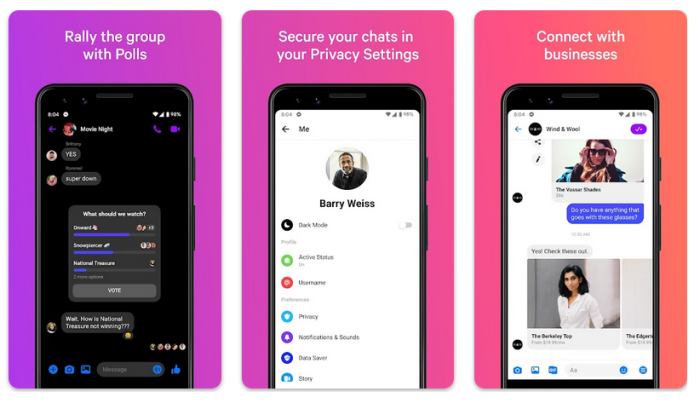
Standard Facebook Messenger messages are not end-to-end encrypted by default in 2026. Facebook (Meta) can technically access these messages and has complied with law enforcement requests for message content. For private conversations, use Facebook Messenger’s Secret Conversations feature — this uses end-to-end encryption (Signal Protocol) so only you and the recipient can read the messages. Activate by tapping the edit/compose icon in Messenger → Secret conversation.
For maximum privacy, use Signal — a fully open-source, end-to-end encrypted messaging app that is widely considered the gold standard for private messaging in 2026.
It is worth adding one reassurance here. Facebook itself is not easy to break into directly; its own systems are well defended. That is exactly why attackers target you rather than Facebook, through phishing, reused passwords and unattended sessions. The good news in that is that the defence is also in your hands. You do not need to out-hack anyone; you just need to close the simple doors that almost every real attack walks through.
How Facebook Accounts Actually Get Compromised
Understanding the real ways accounts are breached tells you exactly what to defend against. Very little of it involves clever hacking; most of it is you handing over access without realising.
Phishing
By far the most common method. You receive a message or email that looks like it is from Facebook, warning that your account will be disabled or asking you to confirm your details. The link leads to a fake login page that captures your password the moment you type it. Facebook will never ask for your password by email, and you should reach the site only by typing the address yourself or using your own bookmark, never through a link in a message.
Reused passwords
If you use the same password on Facebook as on some other site, and that other site is breached, attackers simply try the same combination on Facebook. This is called credential stuffing, and it is automated and relentless. A unique password for Facebook defeats it entirely.
Shared or borrowed devices
Logging into Facebook on a friend computer, a work machine, or a public device and forgetting to log out leaves your account open to whoever uses it next. This is one of the most common ways a partner or family member ends up reading messages, and it needs no software at all.
What To Do If Your Account Is Already Compromised
If you believe someone is already in your account, act in this order, because sequence matters.
- Change your password immediately, from a device you trust. If you can still log in, do it now; if you cannot, use the recovery process below.
- Log out every other session. Go to Settings, Security and Login, Where You Are Logged In, and end every session you do not recognise. This instantly kicks out anyone currently reading your messages.
- Turn on two-factor authentication so that your password alone is no longer enough to get back in.
- Check your recovery email and phone number. Attackers often change these so they can reset your password later. Make sure both belong to you and not to someone else.
- Review connected apps and remove anything unfamiliar, since a lingering app authorisation can be a back door.
- Check for receive text messages from another number or filter rules on your email, because if your email is compromised too, resetting Facebook alone will not keep them out.
If you have lost access entirely, go to facebook.com/hacked and follow the recovery flow. Facebook can help you regain control even when the password and recovery details have been changed, though it takes patience.
Keeping Your Facebook Messages Private
Beyond stopping unauthorised access, it is worth understanding how private your messages are in the first place, because it affects how you use them.
Standard Messenger chats have historically been readable by Meta itself, which matters if you are sending anything genuinely sensitive. Meta has been rolling out default end-to-end encryption across Messenger, but coverage has been gradual, so do not assume every conversation is protected. For anything you truly need kept private, use Messenger Secret Conversations, which are end-to-end encrypted, or move the conversation to a dedicated encrypted app.
A few habits keep your messages away from prying eyes on your own devices too:
- Switch off message previews in your lock-screen notifications, so a passing glance at your phone shows that a message arrived but never its contents.
- Lock the Messenger app with a fingerprint or face unlock, an option available in the app privacy settings.
- Log out on shared devices every time, rather than relying on the browser to forget.
- Be cautious with message requests and links, since a single malicious link can hand over your account through a fake login page.
For a broader look at private messaging beyond Facebook, our guide to the best private, encrypted messaging apps compares the strongest options and explains what actually keeps a conversation secure.
A Stronger Security Routine
The steps above stop an active problem. This routine keeps you safe over the long term, and it takes only a few minutes to set up.
Use a password manager
The single highest-impact change most people can make is to install a password manager such as Bitwarden or 1Password and let it generate a long, unique password for Facebook and every other account. You never have to remember them, and a breach on one site can no longer cascade to your Facebook. This one habit defeats credential stuffing, which is the most common automated attack there is.
Prefer app-based two-factor authentication
When you enable two-factor authentication, choose an authenticator app like Google Authenticator or Authy rather than text-message codes where possible. SMS codes can be intercepted through SIM-swapping, where an attacker persuades your carrier to move your number to their device. An authenticator app is not vulnerable to that.
Do a quarterly security check
Every few months, open Settings, Security and Login, and run through the essentials: review where you are logged in and end anything stale, confirm your recovery email and phone are correct, and glance at your connected apps to remove ones you no longer use. Ten minutes, four times a year, closes most of the gaps attackers rely on.
Watch for the warning signs
Trust the small signals. A login alert from a city you have never visited, a friend mentioning a message you never sent, a password-reset email you did not request; any of these means it is time to run the compromise steps above rather than wait and hope.
Watching a Child on Facebook or Messenger
Some people searching this topic are parents worried about a young child use of Facebook or Messenger Kids. That is a legitimate concern, and it has a legitimate answer that does not involve covert spying.
For a minor, the right approach is openness. Talk to your child about who they are messaging, use Messenger Kids for younger children, which gives parents visibility by design, and pair it with device-level tools like Apple Screen Time or Google Family Link to manage time and downloads. Covert monitoring apps are the wrong tool even here: they break the trust that actually keeps children safe, they put your child data on a third-party server with a poor security record, and most child-safety experts favour transparency over secret surveillance.
The distinction is the same one that runs through this whole guide. Protecting an account, your own or your young child, done openly, is sensible. Secretly intercepting someone messages is neither safe nor legal, and it does not deliver what the person doing it is really hoping for.
Frequently Asked Questions
Can someone read my Facebook messages without my phone?
If your Facebook account credentials (email and password) are compromised, someone can log into your account from any device and read your messages. This is why enabling two-factor authentication is critical. Without 2FA, anyone who knows your password can access your messages. With 2FA enabled, they would also need access to your phone or authenticator app.
Are Facebook messages encrypted?
Standard Facebook Messenger messages are not end-to-end encrypted — Meta can access them. Facebook’s Secret Conversations feature uses end-to-end encryption (E2EE) so only sender and recipient can read them. From 2024 onward, Meta has been rolling out default E2EE for all Messenger conversations, though implementation has been gradual.
What should I do if I think someone is reading my Facebook messages?
Immediately: (1) Change your Facebook password, (2) Enable two-factor authentication, (3) Go to Settings → Security and Login → Where You’re Logged In and log out all other sessions, (4) Review and remove unknown connected apps. If you believe someone installed spyware on your device, factory reset your phone and use a clean device to change all passwords.
The Bottom Line
If you came here hoping to read someone else Facebook messages, the honest answer is that there is no safe, legal, reliable way to do it, and the apps that claim otherwise will cost you money, risk your own device, and leave the underlying worry exactly where it was. Whatever is driving that worry, a relationship or a child, is far better addressed directly than through surveillance that is illegal and self-defeating.
If, on the other hand, you want to make sure nobody can read your Facebook messages, you now have everything you need: a unique password stored in a manager, app-based two-factor authentication, a habit of logging out of shared devices, alertness to phishing, and a quarterly check of your active sessions and connected apps. Do those, and your account becomes a genuinely hard target.
Security is not a one-time task but a small ongoing habit. The few minutes it takes are far less than the cost of losing your account, and unlike spying on someone else, every minute of it is entirely within your rights.

 January 16, 2019




Founder & Editor, TechMaish
Bilal Ahmad is the founder and editor of TechMaish, writing about consumer technology since 2008. For over 18 years he has covered streaming and downloads, games, social media platforms, iPhone and Android, Windows fixes and everyday software, testing tools hands-on and sharing what actually works. He is based in Peshawar, Pakistan.
About MeAll My ArticlesTwitterFacebookLinkedInInstagramPinterest