
July 26, 2011
Office
Send Email To Your Feedburner RSS Subscribers
I was searching for a way to find out how to copy the whole list of my RSS Feed subscribers and send them a message, but did not found any article. I started playing a bit with Feedburner and finally found the way to export the list of all my subscribers to a CSV file.
However it should be noted that Feedburner only allows you to export the emails of your subscibers. It does not provide you with a option to send personalize email to your list. In order to send a personalize email to your subscribers you will either need to use SendBlater Email Sending Software or any other email service like Getreponse and Aweber.
How to Copy Email Address of your RSS Feed Subscribers?
Step 1:- Login to your Feedburner account and click on the blog title (The blog from which you want to export email addresses)
Step 2:- Now click on “Publicize” button.

Step 3:- Click on “Subscription Management” button located at center left side of the page.
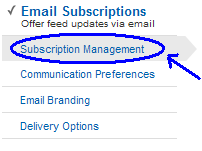
Step 4:- Find “View Subscriber Details” and click on it. You will see the list of email addresses of all your subscribers. The list will contain the total number of subscribers which includes all the email subscribers and those who have used third party subscription services to subscribe to your blog. For example Feedly, BlogLines, Netvibes etc…

Step 5:- Click on “Export CSV” button and save the file. (The file will be in MS Excel format)
Now all your subscriber email addresses have been exported into a CSV file. You can use any service to send emails to your subscribers however make sure to checkout MailChimp which allows you to send upto 20,000 emails to 2000 email subscribers. In Mailchimp you will first need to important your subscribers emails and a one time confirmation email will be sent to your subscribers. All the subscribers who will confirm their email will be added to your list and then you send free emails via MailChimp.
 June 20, 2023
 September 8, 2016
Bilal Ahmad
Founder & Editor, TechMaish
Bilal Ahmad is the founder and editor of TechMaish, writing about consumer technology since 2008. For over 18 years he has covered streaming and downloads, games, social media platforms, iPhone and Android, Windows fixes and everyday software, testing tools hands-on and sharing what actually works. He is based in Peshawar, Pakistan.
About MeAll My ArticlesTwitterFacebookLinkedInInstagramPinterest
20 comments
kamran
Thanks.i got it. Now have you any idea to send Blog old posts to the all subscribers.
i want to send some old post, i tried to change the date but it not
Raj
Is it right to send email to FeedBurner Subscribers…, does feedburner allow this..?
anuj@Google Adesnse Approval
I read your blog using Feedburner. Do me a favor and find a way to send me 500 subscribers so that I can put a nifty little graphic in my sidebar and show it all off. I wonder if anyone is selling subscribers just like people sell followers on Twitter?
Harry Sehgal
Nice Tips. I was also looking to find this Post for so long.
Roy C.C.
The problem is that when you send this way, it will end up in spam folders.
That is very sure.
mimi
please help me.i have a blog and i put subscription form (subscribe via email).i made a new post and the subscriber did not get it..It supposed post the new post i made in my blog automatically to my subscribers right?but it doesnt work.please…anyone out there.thanks 🙂
mimi
this tips also good but this need me to manually send new info from my blog to those email address.thank for this tips
LoungeOwl
Thank you for this tutorial. It’s very clear, but for some reason I don’t have the option “Subscription Management” in my Feedburner account. Maybe this is because I only have the basic version?
Bilal Ahmad
Lounge@ What do you mean by Basic Version.
Vic
Thanks this is great when you want to send information or messages that are beyond your blog. Let’s just be careful not to disrespect the privacy of our subscribers.
Vikash
Thanks. I was looking for this, now i can import the contacts and send them the updates.
buzzknow
aha . .thanks a lot, i’ve searched for this … i want to send email to my subscribers 🙂
regards
Chand
You can not add email address manually to subscribe any one to your blog RSS Feed.
Rob Elings
Hi, great post.
Question: Does anyone know how to manually add email addresses to my FeedBurner list and upload them?
Any help is much appreciated.
Ciao
Rob
Pubudu Kodikara
nice tutorial mate… this is really helpful for me….. can use this to send occasional notifications like new updates!
Chand
Pardeep@ Yes i tried this for giving some free license keys to my subscribers.
This feature is to send a special message or any free stuffs to subscribers. Although spammers can use this for the promotion of there spammy businesses.
But this is a very useful feature for those who want to give some thing to there subscribers.
mk akan
nice tip but quite cumbersome
S.Pradeep Kumar
I haven’t send any emails like this to my subscribers.. 😀
Have you tried dude?
Hernan@TechFC.com
Thanks for this tip 🙂
blinkky
I have though about this before…But don’t know how to do it….Thanks =)