
December 14, 2023
Add Pages in Blogger Blogspot Blog
Blogger is one of the most popular and leading free blogging platform available on internet. Lots of people are making money from there blogspot blogs. I also start my first blog with blogger but after some time i realize that blogger has some limitations. This is because blogger is not a self hosted blog and to gain full control over my blog i migrate my blog to wordpress.
But now blogger is adding lots of features in blogspot blogs. This time blogger added a new and very useful feature that is Adding Pages in Blogspot blog. Now you can easily create Contact Us, Advertise, Privacy Policy and Disclaimer Pages in your blog.
How to Add Pages in Blogger
1. Login to your blogger Dash Board.
2. Click on “Posting >> Edit Pages >> and then Create Page”.
3. Write a Title for your Page and click on “Publish Page” button and select if you want to appear your page in your blog sidebar, blog tab or No gadget. Then click on “Save and Publish” button.
4. Now go to “Layout>> Page Elements and click on “Add a Gedget” and select “Pages” from the list. (Note if the gedget is already address, then click on Edit button.)
 5. In the next box write a title for your pages which will appear in your blog sidebar.
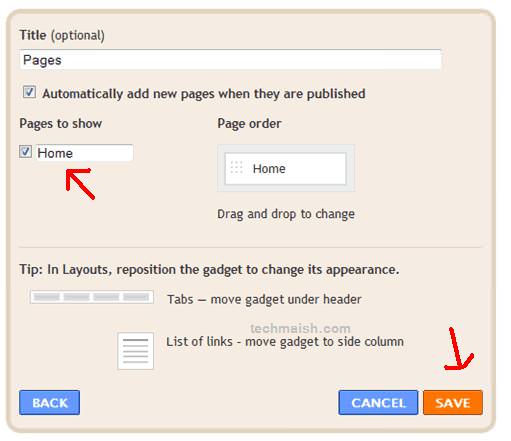 After clicking on “Save” button, you will see a new gadget in your blog sidebar where user can see all your blog pages. In free hosted blogs there are always some limitations and this time it is only 10 pages. Yes you can not create more then 10 pages in your blog. I think these 10 pages are enough in a free hosted blogging platform. If you want to get full control over your blog then migrate your blog to a self hosted platform and create unlimited pages. I hope in future blogger will add more features like this so that there will be no need to migrate to a self hosted platform.


 August 1, 2023




3 comments
Ana
Thank you for instructions. I managed to create and add my own blog Disclaimer.
Rohit Sane
Blogger users were missing this feature like crazy. I think it will make their blog a bit more professional now!
alciput
thank you for the information …
so now I know how to