
March 30, 2010
Windows 7 System Recovery Disc ISO- Recover Missing Files
One of the most accruing problem with internet users is “Windows Cannot start, File Missing or Corrupt”. Specially if there is some important data in your hard disk C: Drive, then this message can make a lot of tension for You. In Windows XP this happens when virus or threats comes to your computer OR during deleting files you delete any important file etc. It is difficult to restore all missing files in windows xp, but in Windows 7 its is very easy.
NeoSmart Windows Recovery Disk provides a very useful software for windows 7 users which allows you to access system recovery option, automated system repair, complete PC backup, command line prompt and and fixes common issues. The software is available for Windows XP, Vista and Windows 7 Versions in 32 Bit and 64 Bit.
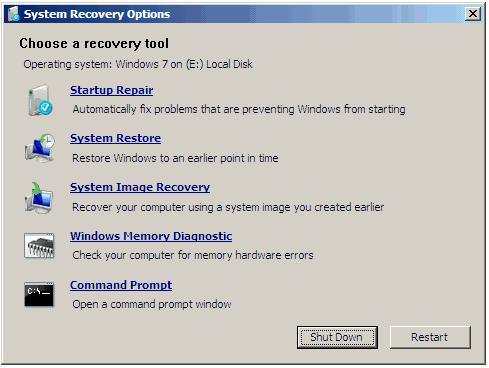
The file is in ISO image and capable of correcting the windows startup boot problems. You must install a ISO burning software like daemon tool or any other software. If you have any problem during installing the ISO file then read the instructions here.
Whenever you want to recover your windows 7 or any other windows, simply press F8 on startup screen and follow the instructions as given. You can see all the instruction in the above screen shot. It is so simple and need no extra knowledge. As we know that in Windows XP it is quite difficult to repair missing files and there is risk that your partition will goes. In Windows 7 there is no need to worry about the partition, because this software has made it very easy to recover missing files.
Note:- This software now works for the Windows XP too. If you would like to make your xp genuine then check this article.
[Download Windows 7 Recovery Disc ISO From Here]
If NeoSmart is not working for your, here are some other alternative software you can try.
- Doctor Byte
- Stellar Data Recovery
- Kroll Ontrack
- Virtual Data Recovery
Related Articles:
- Tips for Recovering Deleted Files
- Recover Deleted Emails
 October 3, 2010
 September 19, 2010




1 comment
woko
whay i can’t download ?