
June 7, 2022
How to Add or Show Gravatar For Comments and Author Profile
Gravatar plays vital role in your blog promotion. Specially when you are commenting and guest blogging on other bloggers blog. If you have a unique gravatar then your fans and readers can easily know you through your unique gravatar. Gravatar can be your blog logo, name, brand or any picture that you would like to make your unique identity. For example when i am posting comments or any blog post on a blog, my gravatar help me in recognizing my identity in blogosphere.

How to Add Gravatar in Comments and Author Profile?
1. First create a account with Gravatar.com (Already a member then Login to your account)
2. After logging In, click on “Add one by clicking here” link to upload your gravatar.
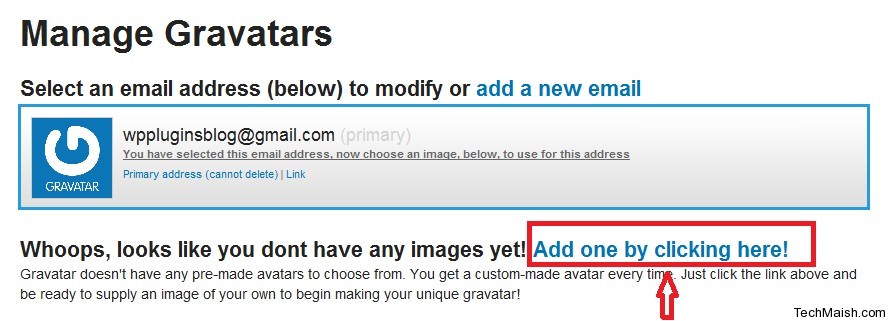
3. Choose the location form where you want to upload your gravatar. (If you want to upload from your computer, then select “My Computer’s Hard Drive” option and brows for the location. Click on “Next” button.
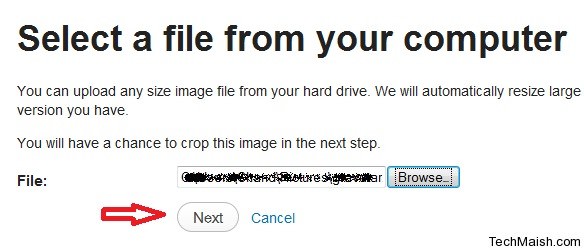 4. Crop the image and choose a rating for your gravatar. Done…!
Now whenever you will post a comment on a blog where gravatar will automatically added to your comment. However this feature will only work on wordpress or those blogs who have enable Gravatar option. Similarly your gravatar will automatically inserted to your Profile Page.

 January 3, 2013
 October 10, 2019
Related Posts
Search Here
8 comments
starfall
im searching for codes that shows gravatar on recent comments on the sidebar. with some excerpt and name of commentator. hope you can help me with it. thanks admin.
ryuzin
I have problem with my blog, all comments by author do not show, only guest comment. Do you know how to fix it?
Sorry for my English!
nfljerseyschiefs
I’m trying to figure out how to use gravatars on my new blog and your article was a lot of help, thanks for writing it.
Shahiran
There is no gravatar available on blogspot blog yet.
Charlotte J
I’m trying to figure out how to use gravatars on my new blog and your article was a lot of help, thanks for writing it.
Bilal Ahmad
Charlotte@ I am glade that you found it useful.
MazaKaro
hehehe, I got what i wanted. I was thinking why i never get my pic when i used to comment on posts while others used to get ….
thanks a lot
Pumama
Old Tip but Useful.This Tip is very good for newbie.
Thanks for sharing!