
January 30, 2012
Enable Show Share Button in Blogger to Show Facebook Buzz and twitter
Although several tutorials are available to to display Facebook, Twitter and Googel Buzz button in your blogspot blog. However not there is no need to follow any tutorial, because Blogger added new feature that is called “Show Share Button” in blogger Dash Board. Now every blogspot can add these button without adding any code. Just follow the below step to enable Show Share Button for displaying twitter,facebook,buzz and blogger button.
How to Enable Show Share Button in Blogger?
1. Login to your blogger Dash Board and then click on the blog for which you want show the buttons.
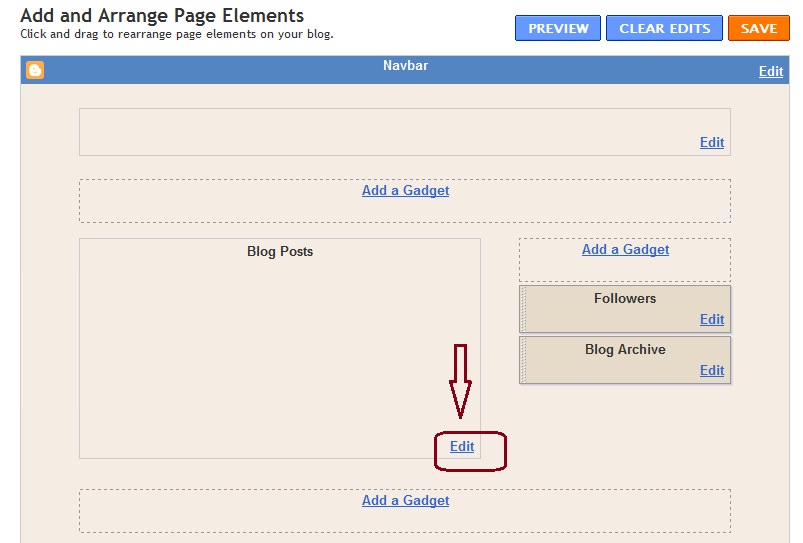
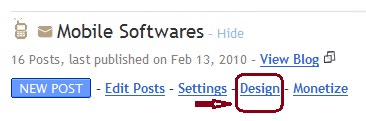 2. Now click on “Edit” button at blog post area.
3. You will see another page, just tick the option for “Show Share Button” and click on click on “Save” button.
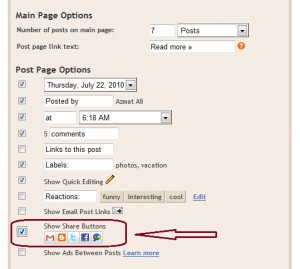 Done……………!
Now you will see all the buttons at the bottom of your blog post. A reader can share your story on Twitter, Google buzz, Facebook or through email with there friends.
 October 18, 2010
- October 25, 2011

3 comments
devin
i can’t get this to work on my blog. it LOOKS like it would work because it’s on the preview section of the post design section. any ideas?
Sourav Saha
Hi,
Great post…but can you tell me how can I add share buttons in my blogspot account same like in this post….there is some cool share buttons which is appearing on mouse over event.
jaganmangat
its a nice and awesome add on,but it doesn’t work in some templates.